

Knowing how to install Windows 10 or Windows 11 can solve many computer problems, including slow performance, software errors, and startup issues. However, incorrect installation can lead to data loss or driver problems.
This guide explains how to install Windows safely and when professional installation is recommended.
Before You Install Windows 10 or Windows 11
Before you install Windows 10 or Windows 11, you must:
- Back up important files
- Ensure stable power
- Confirm Windows 11 compatibility
- Have internet access for drivers and updates
Skipping these steps is the most common reason Windows installations fail.
Creating a Windows Installation USB
To install Windows 10 or Windows 11, you’ll need:
- A USB drive (8GB or larger)
- A working computer
- Microsoft’s official Media Creation Tool
Steps:
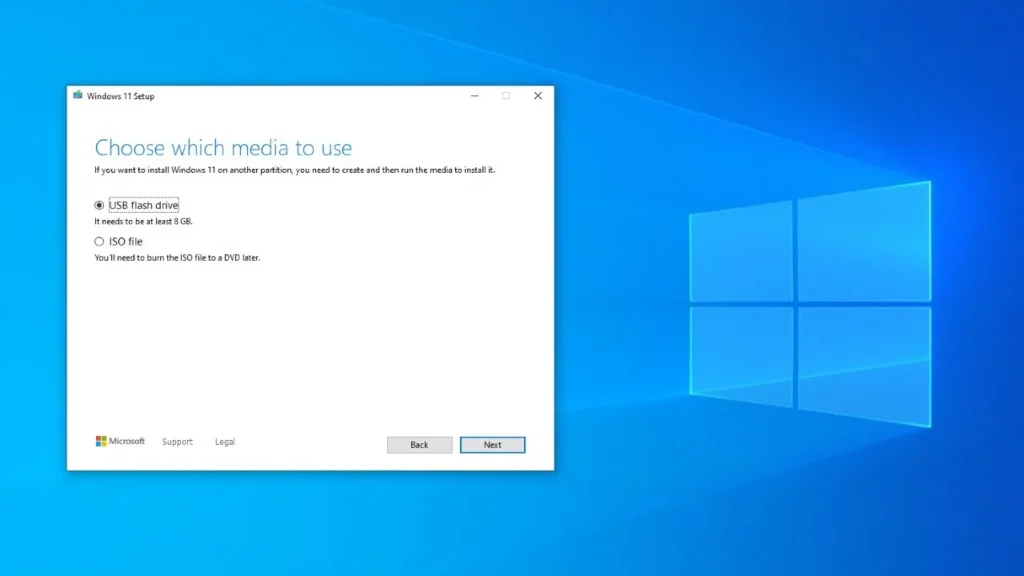
- Download the Media Creation Tool from Microsoft
- Insert your USB drive
- Follow the prompts to create the installer
Installing Windows 10 or Windows 11 (Clean Install)
During installation:
- Choose Custom Install
- Select the correct drive carefully
- Avoid deleting partitions unless you understand them
Selecting the wrong drive can permanently erase data.
Common Problems After Installing Windows
After you install Windows 10 or Windows 11, users often experience:
- No Wi-Fi or sound
- Missing drivers
- Activation issues
- Poor performance
These problems require proper driver installation and system optimization.
When You Should Not Install Windows Yourself
Professional installation is recommended if:
- You need data preserved
- Your computer has boot errors
- The system shuts down unexpectedly
- You are unsure which drive to select
Windows Installation Services in Montego Bay
Lignum Tech provides professional help to install Windows 10 or Windows 11, including:
- Data backup and recovery
- Driver installation
- System optimization
- Software setup
📞 WhatsApp / Call: +1-876-919-6046
🌐 Website: https://lignumtechservices.com
FAQs – Install Windows 10 Windows 11
Will installing Windows delete my files?
Yes, unless files are backed up or preserved during installation.
How long does it take to install Windows 10 or Windows 11?
Most installations take 1–3 hours, depending on system speed.